
Captcha Entry: Typing Job work
Akash VaghaniBusiness
4.82.34K Reviews
- Version
- 2.6.3
- Installs
- 500.00K
- Age Rating
- Everyone
Screenshots

Our Review of Captcha Entry: Typing Job work
 Analysis by Appyee
I approached Captcha Entry as a small business app rather than a conventional productivity tool. Its purpose is simple: it presents captcha tasks, lets you enter the required text, and rewards successful work with points. That narrow focus is both its appeal and its limitation. If you want a lightweight way to spend spare minutes completing repetitive typing tasks, it is easy to understand. If you are looking for dependable employment, a full freelance marketplace, or a serious income stream, you should set expectations much lower.
The app is free, rated for Everyone, and developed by Akash Vaghani. It has built a noticeable audience, with a 4.8 average from roughly 149 thousand ratings and more than 500 thousand installs. Those figures suggest that the basic idea is resonating with many users, although popularity should not be confused with guaranteed earnings. In my experience, the more useful question is not whether it has many users, but whether its task style fits the way you want to use your phone.
How Captcha Entry feels in everyday use
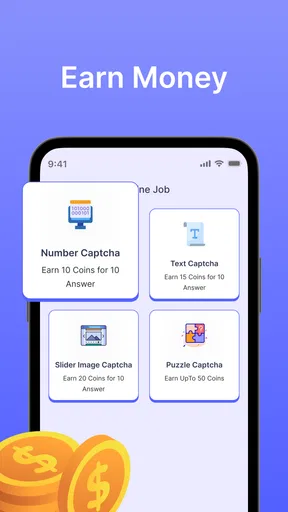
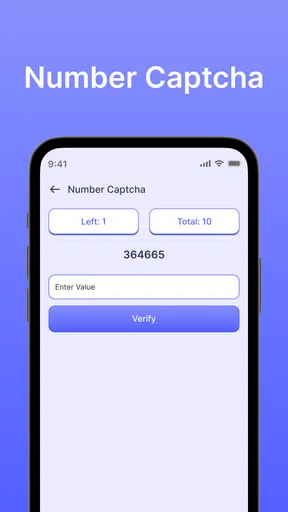
The first thing I noticed is how quickly the concept becomes clear. There is no complicated business profile to prepare, no portfolio to upload, and no long learning curve before you can begin. You work through captcha entries, try to read the characters accurately, submit the answer, and continue. That makes it approachable for someone who wants a very direct task instead of a large platform filled with menus and competing job categories.
A realistic use case is a short break during a commute, a quiet period between appointments, or a few minutes at home when you want something repetitive to do. I would treat it as a spare-time activity, not as a replacement for paid work. The experience is closer to completing small batches of focused typing than to running a business. That distinction matters because the app’s store summary mentions solving captchas and earning points, while points are not the same thing as immediate cash in your pocket.
The strongest part of this design is its low barrier to entry. A user who can read the displayed characters and type them on a phone can understand the central workflow almost immediately. You do not need specialist knowledge, and the Everyone content rating makes the app broadly accessible from an age-classification perspective. The trade-off is that the work can become monotonous quickly, especially if you prefer creative tasks or activities that build a visible skill.
I also found that accuracy matters more than speed. Rushing through distorted characters is likely to create mistakes, and mistakes undermine the point of working quickly. My practical advice is to use a comfortable screen brightness, pause when a captcha is hard to read, and avoid treating every task like a race. A slower, careful rhythm is more sustainable than repeatedly guessing and becoming frustrated.
The current version and what it says about the product
The current release is version 2.6.3, which gives the app a more established feel than a first experimental build. It was released on May 21, 2025, so the product is relatively recent while already having enough public use to attract substantial feedback. I would read that combination as a sign that the developer, Akash Vaghani, is actively shaping a focused utility rather than leaving a one-screen concept untouched.
That does not mean the app has become a complete work platform. Version information can tell me that the product has progressed through updates, but it cannot turn captcha entry into a broader employment service. The core experience remains intentionally narrow. The value of the current release comes from making that narrow loop usable, not from offering the range of tools found in crowdsourcing sites or freelance apps.
For someone installing it today, the minimum operating-system requirement is Android 6.0. That is helpful if you have an older Android phone, although a newer device will usually provide a more comfortable typing experience. Small text, character recognition, and repeated tapping are all easier when the display is responsive and readable. I would not choose a cramped or aging handset for long sessions, even if the software can run on it.
What changed for returning users
Existing users are likely to judge the newer release by reliability rather than by dramatic visual novelty. In an app built around repeated submissions, small improvements to the flow can matter more than decorative redesigns. A smoother transition between tasks, clearer feedback after an entry, or fewer interruptions would directly affect how pleasant a session feels. Those are the areas I would pay attention to when comparing the current experience with an older installation.
There is also a practical reason to keep the app updated: a captcha-based workflow depends on the service continuing to present tasks that the app can display and accept correctly. An old build may become inconvenient even when its basic interface still opens. I would update before judging the service, especially if a returning user notices unusual loading behavior or inconsistent task handling. At the same time, I would not assume that every update automatically changes the earning potential. A newer version can improve usability without changing the underlying value of each task.
One useful habit for returning users is to separate three things in their notes: completed work, points shown in the account, and any eventual redemption result. Keeping those categories distinct prevents a common misunderstanding. A rising points balance may feel encouraging, but the meaningful test is whether the app’s available redemption process works for your situation. I would check that process early instead of spending a long time building a balance first.
Another tip is to test the app in short sessions on both a strong and a weak connection if your routine involves moving between locations. Captcha work is not ideal when the screen refreshes unpredictably or a submission appears to stall. A quick trial can show whether the app suits your normal environment. This is more useful than assuming that a task app will behave equally well on home Wi-Fi, mobile data, and crowded public networks.
Where it compares well with usual alternatives
Compared with a traditional freelance marketplace, Captcha Entry is much easier to start but far less flexible. A freelance platform may offer writing, design, research, delivery, or administrative work, yet those options require profiles, proposals, and sometimes evidence of ability. Here, the entry point is much simpler: perform the task presented to you. That makes this app better for users who dislike pitching themselves, but worse for anyone trying to earn more by developing a valuable specialty.
Compared with survey apps, the work is more mechanical and usually less dependent on answering personal questions. That can be an advantage if you do not want to share opinions or complete lengthy questionnaires. On the other hand, surveys may feel less repetitive and can sometimes explain the reward before you begin. Captcha Entry is a better match for someone who prefers a predictable typing loop and a worse match for someone who needs variety.
It also differs from ordinary typing-practice software. A typing trainer measures speed, accuracy, or progress toward a skill. This app is centered on completing captcha entries and collecting points, so it should not be treated as a structured course. If your main goal is to improve keyboard technique, a dedicated typing tool will probably provide clearer feedback. If your goal is simply to turn spare attention into small task progress, this app has the more relevant format.
The most important comparison is with any service that promises a stable hourly wage. Captcha Entry should not be placed in that category. Task availability, your accuracy, the time you spend, and the way points can be used all affect whether the experience feels worthwhile. I would recommend it as an optional microtask app, not as a financial plan.
Three practical habits that improve the experience
First, create a stopping rule before you begin. For example, decide that you will work through a short session and then review how it felt instead of continuing automatically. This protects you from spending a large amount of time on repetitive entries without noticing how little the activity is adding to your day. The app’s simplicity makes it easy to continue, so the responsibility for pacing sits mostly with the user.
Second, treat difficult captchas as a quality-control signal. If the characters are unclear, zooming may not be available or useful, and guessing can be worse than moving carefully. I would slow down, inspect the whole image, and submit only when the text is reasonably clear. If a task repeatedly feels unreadable, that is a good reason to pause rather than turn frustration into a long session.
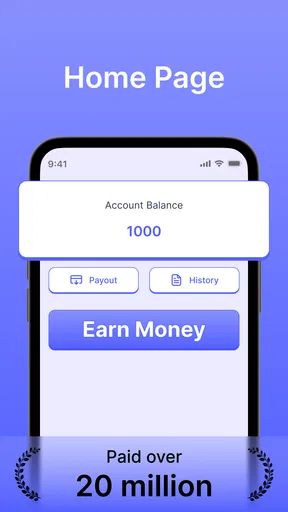
Third, evaluate the points system before investing serious time. Look at how the app presents your balance and what actions are available around it. Do not rely on the emotional effect of seeing points accumulate. The useful question is whether the reward path is understandable and practical for you. This is one of the biggest differences between casually trying the app and using it responsibly.
These habits also reveal a less obvious trade-off: the app may be most suitable for people who value control over commitment. You can open it for a small task window without promising a client a deadline. That flexibility is valuable for students, caregivers, or people with irregular schedules. It is less valuable for someone whose limited free time would be better spent learning a marketable skill or completing a higher-paying assignment.
Who should use it and who should skip it
I think Captcha Entry is worth trying if you want a free, uncomplicated microtask experience and you are comfortable with repetitive visual typing. It may suit users who prefer private, self-directed activity over public profiles and client communication. It is also a reasonable experiment for someone with an older compatible Android phone who wants to see whether a simple task app fits into short breaks.
I would skip it if you need predictable income, guaranteed task volume, or a clear hourly return. I would also avoid making it your main choice if repetitive text entry causes eye strain or hand fatigue. Captcha work can be mentally dull even when the individual task is easy. People who want creative control, career development, or meaningful project ownership will likely get more from a freelance marketplace, a course, or a dedicated productivity tool.
Parents and guardians should still consider how the app fits a young person’s routine, even though its content rating is Everyone. An age label describes content suitability; it does not promise that the activity is financially valuable or that long sessions are healthy. I would encourage breaks and make sure the user understands the difference between points and spendable money before allowing the app to become a regular habit.
Remaining friction and sensible expectations
The central weakness is repetition. The same focused loop that makes the app easy to learn can also make it tiring. There is little room for personal expression, and progress may feel abstract unless the points system gives you a clear reason to continue. I would not install it expecting the variety found in a general task marketplace.
Another source of friction is the gap between activity and outcome. Completing entries feels immediate, while the usefulness of the points may require additional steps. That delay can make the app feel less satisfying than a normal paid gig where the agreed price is visible from the beginning. Before committing time, I would make sure I understand the in-app reward flow and whether it matches what I personally consider worthwhile.
Accuracy can also become a hidden cost. A user who works too quickly may spend time correcting avoidable errors, while a careful user may find the pace too slow. There is no single ideal rhythm because eyesight, keyboard comfort, and patience differ. My best approach is to measure the experience by concentration and comfort, not by the number of screens completed in a burst.
Finally, the app’s narrow purpose means that it cannot replace several tools at once. It is not a note-taking app, a client-management system, a typing tutor, or a full income platform. That is not a flaw in itself, but it becomes a problem when users expect one small app to solve a much larger work need.
What I would watch in future updates
For future versions, I would watch how clearly the app explains task status and points. Users benefit when they can tell whether an entry was accepted, whether a balance changed, and what action comes next. Clear feedback reduces uncertainty and makes it easier to decide whether another session is worth the time.
I would also look for improvements that reduce fatigue without changing the app’s simple identity. Better readability, sensible spacing, and a smooth handoff from one captcha to the next would matter more to me than extra decoration. If the developer adds features, they should support accurate entry and transparent rewards rather than make the interface busier.
Existing users should pay attention to whether updates improve consistency while preserving the straightforward workflow. New users should judge the current release on a small trial, not on the impressive size of its audience alone. The 4.8 average and broad install base are encouraging signs of user interest, but personal usefulness still depends on task comfort and reward expectations.
My final view is that Captcha Entry is a focused free business app with a clear place in the microtask category. I like its directness: there is no elaborate setup, and the basic activity is easy to understand. I would recommend it to a friend only with one condition: use it as an occasional spare-time option, keep sessions controlled, and verify that the points experience feels worthwhile before giving it regular attention. For dependable earnings or richer work, I would choose a different kind of platform. For simple captcha entry on an Android device, this release is a reasonable app to test with modest expectations.
Verdict
Strengths of Captcha Entry: Typing Job work
- Simple interface that is easy to understand for first-time users.
- Can be used casually without committing to fixed working hours.
- Tasks are generally short and straightforward to complete.
- Useful for practicing typing speed and accuracy.
- May work on older Android devices with limited hardware.
Limitations of Captcha Entry: Typing Job work
- Earnings per task can be very low and require significant time.
- Task availability may vary considerably by location and demand.
- Typing mistakes can reduce acceptance rates or expected rewards.
- Some users may find repetitive captcha work tiring over time.
- Payment methods, limits, and processing times may not suit everyone.
Similar Picks in This Category
View All
LinkedIn: Community & Network
LinkedIn3.8

Zoom Workplace
zoom.com4.1

Microsoft Teams
Microsoft Corporation4.6

Meta Business Suite
Meta Platforms, Inc.4.6

Webex Meetings
Cisco Systems, Inc.4.5

TeamViewer Remote Control
TeamViewer4.4
Frequently Asked Questions
What is Captcha Entry: Typing Job work, and how does it work?
Captcha Entry: Typing Job work is presented as a task-based application where users type characters shown in CAPTCHA images and may receive points or earnings for completed entries. After installing it, users generally need to create an account, follow the task instructions, and submit answers accurately. The available work, payment rules, and task frequency can vary, so reading the in-app terms carefully is important before investing time.
Can you really earn money with Captcha Entry: Typing Job work?
The app may advertise online income through CAPTCHA typing, but earnings should not be considered guaranteed. Income usually depends on the number of tasks available, your accuracy, the payment threshold, and the platform’s current policies. Before beginning, check whether the application clearly explains rates, withdrawal methods, processing times, and possible fees. Treat claims of fast or high earnings cautiously and avoid paying money to unlock ordinary tasks.
Is Captcha Entry: Typing Job work safe and legitimate to use?
Safety depends on how the application handles personal information, payments, and user accounts. Before registering, review its privacy policy, developer details, permissions, user reviews, and contact information. Be especially careful if it requests unnecessary access to your device, sensitive identity documents, banking credentials, or upfront payments. A legitimate typing platform should explain its business model and payment conditions clearly rather than relying only on promotional promises.
What skills or requirements are needed to use the app effectively?
The main requirement is the ability to read CAPTCHA images and type the displayed characters accurately, often within a limited time. A stable internet connection, a compatible Android or iOS device, and an active account may also be necessary. Users should expect repetitive work and potentially unclear or distorted images. Strong attention to detail is useful because frequent mistakes can reduce task approval, points, or eligibility for future work.
What should I check before downloading and starting tasks?
Before downloading Captcha Entry: Typing Job work, confirm that you are using the official store listing and that the developer information is consistent. Read recent reviews, examine the permissions requested, and verify the minimum withdrawal amount and supported payment options. Also check whether the service is available in your country and whether its terms prohibit automated tools or multiple accounts. Never share passwords or payment details unless the platform’s security practices are clear.
